Feed Melvin
Adventures in Triple Feeding
(Vibe it and Focus on the Art!)
Thanks for reading, if you enjoy this consider buying me a coffee!
Our first born came to us in January of this year (2026) two weeks early. It was clear that he had plenty of room to grow and our sleepy newborn needed a lot of attention to get him to gain weight in the first few months. We understood that he needed to gain at least 1 ounce per day to get on track and so I did what I tend to do when faced with a challenge. I turned it into a game!
We bought a scale, fed him every 2 hours (or more if he wanted it), washed ALOT of bottles, and weighed him daily to gauge how we were doing without having to wait for a checkup at the Pediatricians office. If he was on track for that day we celebrated. If he came in a little low we tweaked the frequency, amount per bottle, kept him upright, burped him more frequently, and did our best to find the balance of giving him the opportunity to eat as much as possible without spitting it all up!
All that work paid off and the little guy (well not so little anymore) has more than doubled his birth weight!
While all that was going on, I thought "Hey, since we've made this into a game. Mabye I could make this into a game that you all can play as well..."
Using Gemini on my mobile phone, I was able to do all of the vibe coding and testing with one hand while feeding an infant! Finding time to sit at my desktop computer to work on projects was very limited if non-existent when our baby was just a few months old. Because of this, I looked for ways to test the game that was being generated on my phone on that same device so that I could work on it in spurts while feeding bottles and running errands.
A web browser game fit the bill perfectly. If I could generate functional web code with Gemini then I should be able to test the .html file on my phone in any browser. Growing up I was really enamored by the digital pets of the 90s like Tamagotchi, Pocket Pikachu, and Digimon so when I started by prompting the coding assistant I asked it to make a blob that gets bigger every time you tap on it to simulate feeding.
I copied the HTML and JavaScript from Gemini into the Quick Edit app on my phone and saved it as a .html file. From there I was able to open it in Chrome or using the RUN feature in Quick Edit. It may seem underwhelming but this went from an idea in my head to something I could work on no matter where I was almost instantly. The first version of the game looked like this:
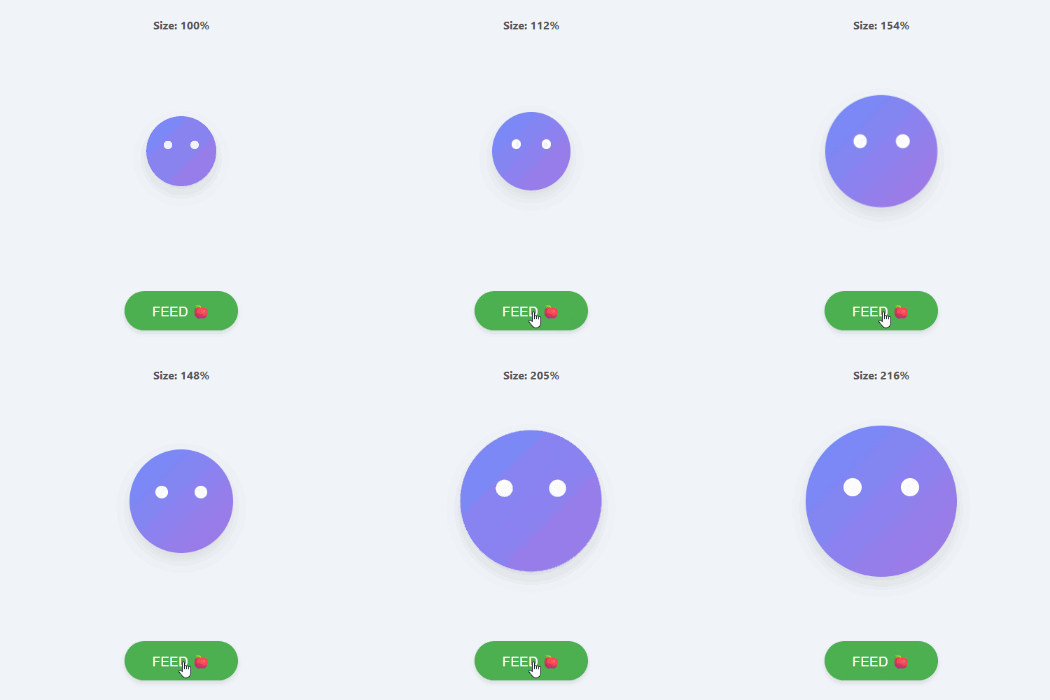
With my son propped up in my lap and a bottle in one hand, I watched my blob grow when I tapped feed and shrink when I stopped. Then I thought, “Wouldn’t this be more interesting if you had to be careful to not over-feed the blob like an infant?” So I continued to prompt the code assistant and tweaking parameters and this little blob feeding game began to evolve into a baby feeding simulator.
By default Gemini wanted to be my assistant, not my programmer. The Canvas feature in Gemini had not yet been released when I started this project and Gemini’s posture when working on this was to give me coding advice and snippets by default, not full code. Because my time was limited I wanted to have a true vibe-coding workflow for this project and so I started instructing the AI to strictly deliver edits made in the full game code.
Within a chat session Gemini would generally get the hang of this and do it without being asked but occasionally would forget and deliver snippets and instructions instead. When this happened I simply entered a prompt asking it to incorporate the edits or new features into the most recent version of the full code.
As a programmer Gemini is over-zealous. Vibe Coding allowed me to avoid sifting through hundreds of lines of code but I quickly realized that each iteration would potentially lose aspects that I was happy with, or new elements would be introduced without my asking for them. The AI wanted to be proactive and would deliver my requests back to me with “Here is your update, and I also did this that and the other thing while I was at it!”
Sometimes those suggestions gave me interesting ideas for next steps but the process was overall unstable and unsustainable if I was going to continue to work this way. I started adding “only make changes that I explicitly ask for” to every prompt until Gemini pointed out that I could add Rules in the preferences for the app. Once the “only do what I ask you to rule” was applied the process became a lot more stable and if I was brainstorming I could still ask Gemini to suggest things.
Thinking mode in Gemini consistently worked much better than Fast. Lorem ipsum dolor sit amet, consectetur adipiscing elit, sed do eiusmod tempor incididunt ut labore et dolore magna aliqua. Ut enim ad minim veniam, quis nostrud exercitation ullamco laboris nisi ut aliquip ex ea commodo consequat. Duis aute irure dolor in reprehenderit in voluptate velit esse cillum dolore eu fugiat nulla pariatur. Excepteur sint occaecat cupidatat non proident, sunt in culpa qui officia deserunt mollit anim id est laborum.
I continued on the path of keeping all development locally on my phone for the prototyping phase all assets were generated in the game code itself. This consisted of SVG graphics directly in the index.html as Base64 encoded images (generated by Gemini) and sounds produced by JavaScript oscillators during gameplay rather than loading an external audio file.
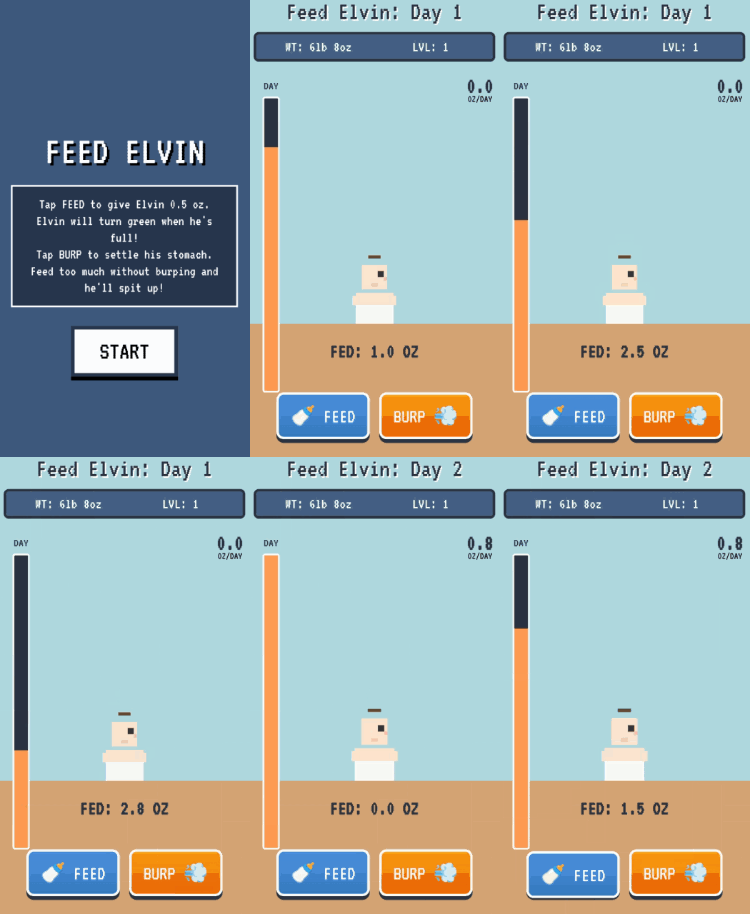
At this point I had a full prototype of a baby-feeding simulator including a countdown timer (to simulate the limited time a parent has in a day), visual growth when feeding him, and weight gain that occurs at the beginning of each day. I even had a spit-up effect for when the overfeeding penalty was triggered and a SUPER version of the character that was triggered if you achieved a 2 ounce per day average.
I was excited to share my progress so I uploaded the prototype as a subpage on this Squarespace website and started texting it to a few friends and family members. You can play the early version here:
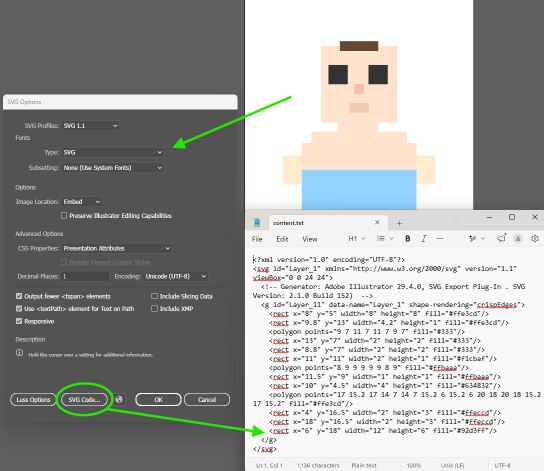
I knew the artwork needed some love if I was going to keep working on this past the prototype phase. Because the graphics were generated as SVG images, I had the idea that I could use Adobe Illustrator to make custom artwork to replace it. Illustrator reads XML encoded SVGs, so I wanted to convert the existing Base64 graphics (that lived in the game code) into XML graphics that I could use as a jumping off point to match their size. There are online tools that will convert Base64 into SVG that Illustrator can use but ultimately I ended up having Gemini replace the Base64 images with XML encoded SVGs. I would then ask Gemini to isolate the text containing the graphic information so that I could copy it into an e-mail and send it to myself to import into Illustrator. Simply creating a new text document, pasting the SVG data into it, and saving it as .svg would create an image file that I could view on my computer and import into Illustrator.
I tested making edits in Illustrator and sending the images back to my Android phone (remember I’m doing as much of this on my mobile device as possible). Illustrator has a handy feature that would open the SVG code in a text document that I could copy into an email to pickup on my phone. I then asked Gemini to replace the existing graphics with my edits and it worked! I now had a pipeline to get my own artwork into the game that would allow me to control all aspects of the way it looked — from character graphics, to menus and buttons.
I took the retro feel of the game and ran with it. Until now I hadn’t done much pixel-art but I’ve always found it’s simplicity nostalgic and endearing. A retro pixel-art style would elevate the games graphics from the somewhat strange images that Gemini produced, so I set out to re-design the characters. With a little research I determined that Photoshop would be the most logical tool for drawing in this style. By using a low resolution canvas (I landed on 48 X 48 pixels) and the pencil tool, I created the first drawing of the pixel-art baby.

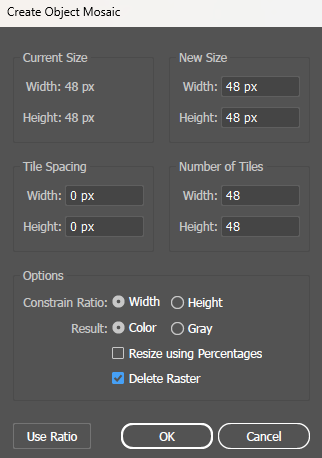
I wanted the graphics to stay crisp even as the baby grew and shrank and began looking for a way to convert the rasterized images that I was creating in Photoshop into SVG again. Because I knew the images were 48 X 48 pixels, I could import the Photoshop artwork into Illustrator and use the Object > Create Object Mosaic tool to turn the pixels into vector tiles. Each square became it’s own vector object which created a heavy SVG file and so I used the Select by Color and Unite options to combine connected areas into one object. Little did I know this workflow would become obsolete by the time I finished the project but I will cover that later on.
I had the idea to use sprite sheets for animation. Lorem ipsum dolor sit amet, consectetur adipiscing elit, sed do eiusmod tempor incididunt ut labore et dolore magna aliqua. Ut enim ad minim veniam, quis nostrud exercitation ullamco laboris nisi ut aliquip ex ea commodo consequat. Duis aute irure dolor in reprehenderit in voluptate velit esse cillum dolore eu fugiat nulla pariatur. Excepteur sint occaecat cupidatat non proident, sunt in culpa qui officia deserunt mollit anim id est laborum.
Using Gemini I created Sandboxes to test sprite sheets. Lorem ipsum dolor sit amet, consectetur adipiscing elit, sed do eiusmod tempor incididunt ut labore et dolore magna aliqua. Ut enim ad minim veniam, quis nostrud exercitation ullamco laboris nisi ut aliquip ex ea commodo consequat. Duis aute irure dolor in reprehenderit in voluptate velit esse cillum dolore eu fugiat nulla pariatur. Excepteur sint occaecat cupidatat non proident, sunt in culpa qui officia deserunt mollit anim id est laborum.
Then everything fell apart. As I continued to refine features and update graphics the whole process seemed to become unstable, especially when it came to the character graphics. I would tweak features or images and test them only to find that a character graphic had become garbled or was missing. I lost the better part of a weekend re-pasting character graphics into Gemini and asking it to swap the working version in verbatim to no avail.
At this point the singular index.html for the project was a monolithic 3,000+ lines and the baby graphics had become more complex containing thousands of text characters that needed to be woven into the code. I started to understand that Gemini was struggling to translate these long strings of text into an already lengthy codebase without hallucinating.
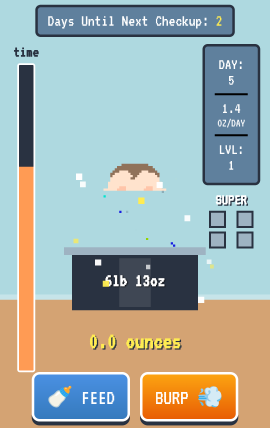
The graphic update process needed to be stabilized, otherwise I wouldn’t be able to continue to make progress. This lead me to create the first external assets for the game in the form of actual .svg files (rather than long strings of text) that could be hosted on the web. I had been using Squarespace to host the game so far and unfortunately their tool does not allow for SVG images to be stored on their servers due to security concerns. I thought that I had found a workaround — by uploading the images as a link I could create a URL for my graphics that could be added back into the game. This would eliminate tedious text copying for graphic updates, and another advantage also became clear. To change an image I simply needed to replace the file that the URL pointed to, and the game would update the next time I loaded it.
I seemed to have found the stability I was looking for and also gained efficiency. But then my images started to disappear from their URLs one by one. I guess Squarespace really didn’t want SVGs on their servers. GitHub on the other hand happily accepts SVG.
I created a GitHub repository for the game and stumbled onto something that would change the way I worked moving forward. Using GitHub Pages the files you host on GitHub can be made into a live website. Free of charge. I yearned for a clean URL to send people to the game and setting up a custom URL on GitHub pages is relatively straightforward. I uploaded my code in addition to the graphic assets to GitHub and purchased feedmelvin.com
Context is king. The graphic pipeline was now working like a charm but Gemini was started taking longer and longer to think and often broke things even with my “don’t change anything I don’t tell you to” rule in place. This being my first major project using AI, I was not familiar with context windows.
SVG layout methods. Lorem ipsum dolor sit amet, consectetur adipiscing elit, sed do eiusmod tempor incididunt ut labore et dolore magna aliqua. Ut enim ad minim veniam, quis nostrud exercitation ullamco laboris nisi ut aliquip ex ea commodo consequat. Duis aute irure dolor in reprehenderit in voluptate velit esse cillum dolore eu fugiat nulla pariatur. Excepteur sint occaecat cupidatat non proident, sunt in culpa qui officia deserunt mollit anim id est laborum.
I got an earworm. Lorem ipsum dolor sit amet, consectetur adipiscing elit, sed do eiusmod tempor incididunt ut labore et dolore magna aliqua. Ut enim ad minim veniam, quis nostrud exercitation ullamco laboris nisi ut aliquip ex ea commodo consequat. Duis aute irure dolor in reprehenderit in voluptate velit esse cillum dolore eu fugiat nulla pariatur. Excepteur sint occaecat cupidatat non proident, sunt in culpa qui officia deserunt mollit anim id est laborum.
Cross platform testing. Lorem ipsum dolor sit amet, consectetur adipiscing elit, sed do eiusmod tempor incididunt ut labore et dolore magna aliqua. Ut enim ad minim veniam, quis nostrud exercitation ullamco laboris nisi ut aliquip ex ea commodo consequat. Duis aute irure dolor in reprehenderit in voluptate velit esse cillum dolore eu fugiat nulla pariatur. Excepteur sint occaecat cupidatat non proident, sunt in culpa qui officia deserunt mollit anim id est laborum.
In conclusion. Lorem ipsum dolor sit amet, consectetur adipiscing elit, sed do eiusmod tempor incididunt ut labore et dolore magna aliqua. Ut enim ad minim veniam, quis nostrud exercitation ullamco laboris nisi ut aliquip ex ea commodo consequat. Duis aute irure dolor in reprehenderit in voluptate velit esse cillum dolore eu fugiat nulla pariatur. Excepteur sint occaecat cupidatat non proident, sunt in culpa qui officia deserunt mollit anim id est laborum.